OCZ FlexXLC PC2-6400 CL3 DDR2 memory review
Test system
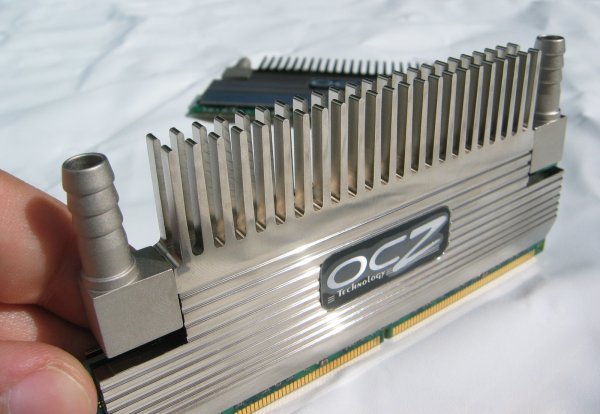
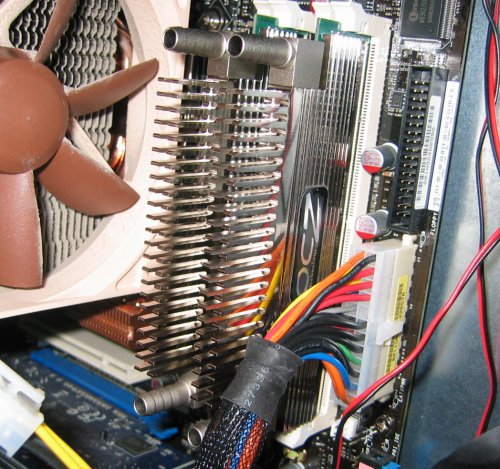
- Intel Core 2 Duo E6400 processor with OCZ Vendetta HSF (note: I was still using the Noctua NH-U12F HSF on the photo below)
- Asus Commando motherboard
- ASUS EN7300GS/HTD 256MB
- 2GB OCZ Flex XLC PC2-6400 CL3 memory
- Seagate 320GB HDD
- CoolerMaster Cosmos case
- PC Power & Cooling Silencer 750 PSU
- Dell 2407WFP LCD display
- Operating system: Windows XP SP2
Overclocking and benchmarking
The looks of the OCZ Flex XLC are pretty good but what interests us the most is the performance of course. The first thing I tried was the advertised timings - I booted the test system with the memory at 800MHz with 3-4-4-15 timings at 2.1V and started running some benchmarks.
Once I had gathered all benchmark results at stock speeds I decided to see how low I could get the timings at 800MHz with a voltage of 2.4V. Some people managed to get this memory running at 3-3-3-12 but my modules weren't capable of this. The best I could do was 3-4-3-12 - I couldn't get the system to boot with the TRCD at 3.
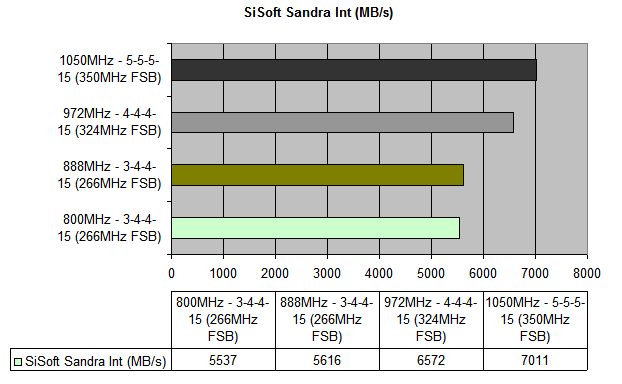
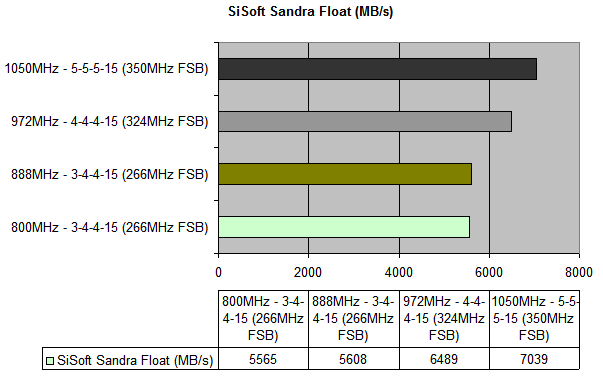
The next test was to see how far I could overclock the memory with the advertised 3-4-4-15 timings and 2.4V. I stranded at 888MHz which isn't really bad, it's an overclock of 11%. It was possible to boot the system at higher frequencies but then it wouldn't pass a Prime95 test anymore.
I then also tested how far the memory could go at 4-4-4-15 and 5-5-5-15 timings. With 4-4-4-15 timings and 2.4V the memory achieved a maximum stable frequency of 972MHz. The last test was to see how far it would scale with loose 5-5-5-15 timings and the best it could do was 1050MHz. Much higher than that wasn't possible without Prime95 spitting out error messages. Some users report much higher overclocks but each memory module is different of course.
Unfortunately I wasn't able to test if the liquid cooling has any impact on the overclocking potential as I currently don't have a WCed rig. However, colleagues who did test this claim that while the liquid cooling does lower the temperatures a lot it has very little impact on the overclocking results.
So to sum it up:
Before I moved on to all the overclocking tests I decided to check how big the difference is between 3-4-4-15 and 4-4-4-15 timings:3-4-3-12 = 800MHz 3-4-4-15 = 888MHz 4-4-4-15 = 972MHz 5-5-5-15 = 1050MHz
| OCZ Flex XLC DDR2 800MHz - CL3 vs CL4 | ||
| Benchmark | 3-4-4-15 | 4-4-4-15 |
| SiSoft Sandra Int | 5537MB/s |
5595MB/s |
| SiSoft Sandra Float | 5565MB/s |
5422MB/s |
| SuperPI 2M | 61,985s |
62,39s |
| PC Wizard Latency | 69ns |
70ns |
| PCMark05 | 4567 |
4548 |
| AquaMark | 35023 |
35023 |
| AquaMark CPU | 12898 |
12834 |
| WinRAR | 1,089MB/s |
1,055MB/s |
In most tests, there's indeed a noticeable difference, in all but two tests the CL3 timing was slightly faster than CL4. If you can't choose between the CL3 and CL4 versions of this memory kit it's probably best to go for the CL3 version as that one may offer more overclocking potential and costs only a few bucks more at some big e-tailers like NewEgg.
SiSoft Sandra XI
First I checked the memory's maximum bandwidth with SiSoft Sandra. Here's the integer performance:
And here's the floating-point bandwidth:
PCWizard 2007 Memory Latency
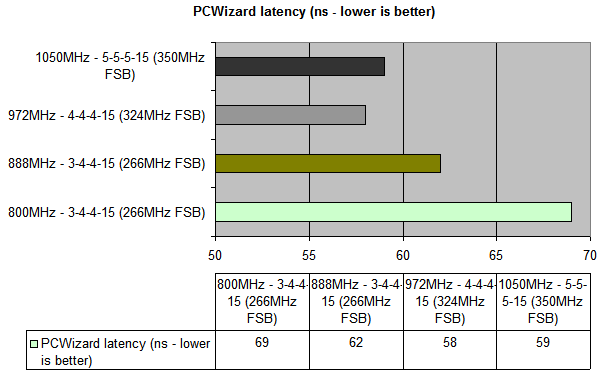
This program was used to check the latency of each memory setting. The results are in nanoseconds so lower is better:
SuperPI
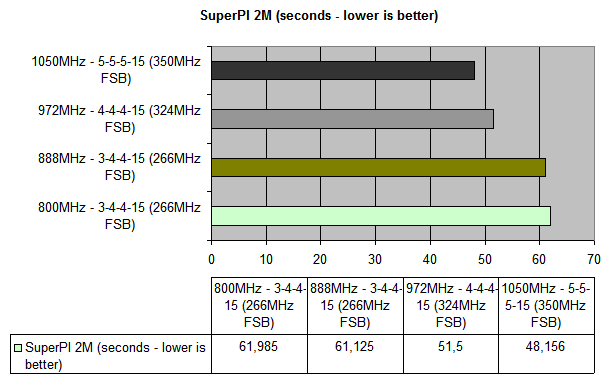
This little program was used to check how fast the test system could calculate two million digits of PI. Lower is better as the results are in seconds:
PCMark05
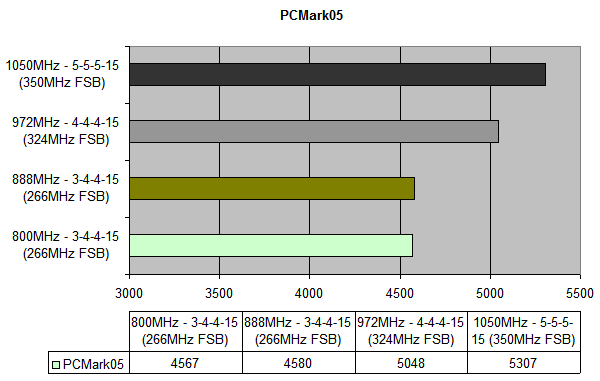
Futuremark's PCMark benchmark suite aims to test the overall performance of your system. The performance of your CPU, memory, graphics card and HDD all play a role in this test. It includes tests like Windows XP startup speed, hard drive speed, physics and 3D, web page rendering, video encoding, audio compression, file compression, virus scans and various other tests.
 Previous Page (1/3)

Added: October 20th 2007
Product reviewed: OCZ FlexXLC PC2-6400 CL3 DDR2 memory
Reviewer: Thomas De Maesschalck
Score: 9/10
Page: 2/3
