DV Hardware bringing you the hottest news about processors, graphics cards, Intel, AMD, NVIDIA, ATi, hardware and technology!

   Home | News submit | News Archives | Reviews | Articles | Howto's | Downloads | Mirror Area | Advertise
 
DarkVision Hardware - Daily tech news
  Login/sign up  


Main Menu

Home
User account
Info
News archives
Links
Articles
Howto
Reviews
Member list
 

Who's Online
There are currently 290 people and 1 DV-member(s) online.


Latest Reviews
  • Super Talent Pico 8GB USB Drive
  • Razer Destructor mousepad
  • Ghost Squad for Nintendo Wii
  • OCZ DDR2 PC2-9200 Reaper HPC Edition
  • Vizo Ninja II notebook cooler
  • PC Power & Cooling Silencer 610 PSU
  • Mario & Sonic at the Olympic Games for Nintendo Wii
  • OhMiBod Boditalk Escort
  •  

    RSS
    RSS
    RSS by email. Enter your email address:


    Download sd4hide.exe and how to play games with it

    Posted on Friday, December 09 2005 @ 16:05:34 CET by Thomas De Maesschalck


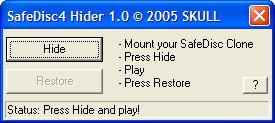
    SafeDisc 4 Hider 1.0, aka sd4hide or sd4hide.exe, is a program developed by Skull.

    You can use it to play with legal images (backups stored on your hard drive) of your games. It helps you to circumvent the SafeDisc 4 protection which prevents you from playing with backups.

    SD4Hide is used in combination with Daemon Tools, although it's may work with other tools too. Daemon Tools is a program which enables you to load images, or clones, of games (and other software) in virtual drives.

    Instead of sd4hide.exe you can also use Anti-Blaxx but I prefer using sd4hide because it's a lot easier to use. But the advantage of Anti Blaxx is that it's compatible with other technologies such as SecuROM 4-7, Protect CD V5 and JoWood X-Protect.

    Anyway, to play games with sd4hide you need to do the following:
  • Mount the image in Daemon Tools
  • Run sd4hide.exe
  • Press "Hide", sd4hide makes a small adjustment to a Windows registry setting and now you can play. The program also saves a small backup to restore the registry setting.
  • After playing click on "Restore" and close sd4hide.
  • It's quite simple to use, but in order to run it you'll need Administrator rights on your computer. Otherwise it may not work.

    Download: sd4hide.exe (159KB).


    Add to Del.icio.us | Digg It

     
    Threshold
      
    The comments are owned by the poster. We aren't responsible for their content.
    Re: Download sd4hide.exe and how to play games with it (Score: 0)
    by Anonymous on Monday, March 26 2007 @ 12:50:22 CEST


    [ Reply to This ]

    Re: Download sd4hide.exe and how to play games with it (Score: 0)
    by Anonymous on Thursday, March 29 2007 @ 20:39:57 CEST


    [ Reply to This ]

    Re: Download sd4hide.exe and how to play games with it (Score: 0)
    by Anonymous on Saturday, April 07 2007 @ 15:20:36 CEST
    good


    [ Reply to This ]

    Re: Download sd4hide.exe and how to play games with it (Score: 0)
    by Anonymous on Saturday, April 07 2007 @ 15:20:40 CEST
    good


    [ Reply to This ]

    Re: Download sd4hide.exe and how to play games with it (Score: 0)
    by Anonymous on Tuesday, April 10 2007 @ 16:19:30 CEST


    [ Reply to This ]

    Re: Download sd4hide.exe and how to play games with it (Score: 0)
    by Anonymous on Friday, July 20 2007 @ 14:54:36 CEST


    [ Reply to This ]

    Re: Download sd4hide.exe and how to play games with it (Score: 0)
    by Anonymous on Tuesday, July 31 2007 @ 01:18:10 CEST
    merci!merci!merci!merci!


    [ Reply to This ]

    Re: Download sd4hide.exe and how to play games with it (Score: 0)
    by Anonymous on Thursday, September 13 2007 @ 10:46:19 CEST
    5655


    [ Reply to This ]

    Re: Download sd4hide.exe and how to play games with it (Score: 0)
    by Anonymous on Friday, November 16 2007 @ 22:38:43 CET


    [ Reply to This ]

    Re: Download sd4hide.exe and how to play games with it (Score: 0)
    by Anonymous on Saturday, November 17 2007 @ 18:15:46 CET
    é um programa muito bom


    [ Reply to This ]

    Re: Download sd4hide.exe and how to play games with it (Score: 0)
    by Anonymous on Sunday, November 25 2007 @ 13:27:44 CET
    lm


    [ Reply to This ]


    DarkVision Hardware - Privacy statement
    All logos and trademarks are property of their respective owner.
    The comments are property of their posters, all the rest © 2002-2008 DarkVision Hardware