Mobile Firefox user interface preview
 Posted on
by Thomas De Maesschalck
Mozilla unveiled some details about the mobile version of Firefox, you can check it out over here.
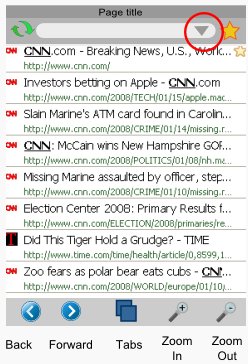
The toolbar at the bottom contains the most frequently used functions - back/forward, zoom in/out and tabs. This toolbar cannot be hidden, and is generally present in all browser screens. The buttons may sometimes change depending on the screen.
Web page content is displayed in the center panel, and can be scrolled/panned directly by dragging. Scrollbars are normally not shown to maximize screen real estate, but can be shown during scrolling to provide a visual cue of the overall page size.
At the top of the screen is a title bar with a hideable toolbar beneath. This toolbar has a reload button, a URL bar, and a bookmark button.
This UI layout enables quick 1-touch access to the most frequent browser activities.

Comments (0)
No comments yet.