Corsair HX1000i SHIFT Crystal PSU has transparent panels
 Posted on
by Thomas De Maesschalck
Here's something interesting: Corsair cooked up a new power supply that shows off its internals by sporting transparent panels. The firm went the extra mile here to make its power supply a piece of beauty worthy of getting put on display. Here's the full PR:
CORSAIR® (Nasdaq: CRSR) is proud to launch the HX1000i SHIFT CRYSTAL, its first power supply with active 12V-2x6 per-pin overcurrent protection via PinProtect+. The power supply also simplifies builds by powering up to 24 iCUE LINK devices directly from the integrated iCUE LINK System Hub, and delivers stunning visuals with the transparent side panels, an RGB-lit fan, and custom-made Japanese capacitors.
The HX1000i SHIFT CRYSTAL began as a prototype shown at COMPUTEX 2025, and the positive response led CORSAIR to bring it to market. Built on the current HXi SHIFT platform, it is the first CORSAIR power supply with PinProtect+ per-pin overcurrent protection (OCP) for the native 12V-2x6 GPU connection. Cybenetics Platinum-rated efficiency, ATX 3.1 certification, PCIe 5.1 compliance, and comprehensive CORSAIR iCUE software control deliver the performance, protection, and flexibility that demanding PCs need.
CLEARLY SUPERIOR
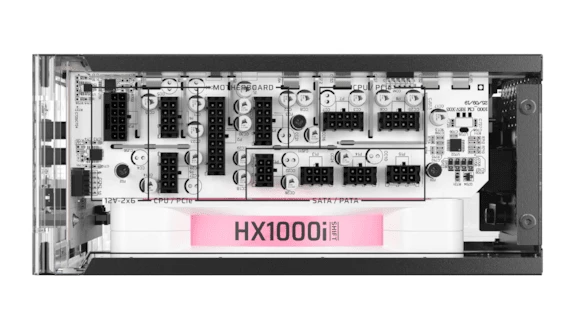
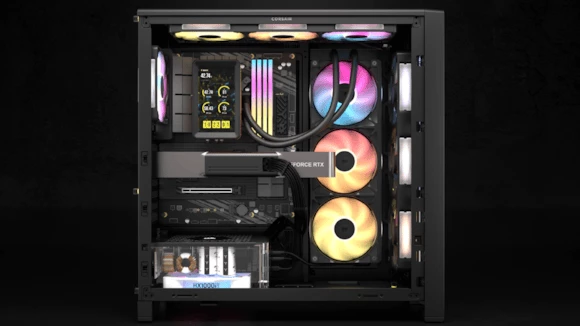
The HX1000i SHIFT CRYSTAL features transparent polycarbonate windows on three sides, offering an unobstructed view of its internal components, such as the custom 105°C-rated capacitors. Designed to make the engineering within as impressive as your finished build, the see-through enclosure transforms the power supply into a centerpiece for showcase PCs. An integrated 140mm Magnetic Dome bearing fan features customizable RGB lighting that enhances system aesthetics and provides visual feedback on the status of the native 12V-2x6 overcurrent protection when PinProtect+ activates, combining customizable illumination with useful system information.
PINPROTECT+ GPU PROTECTION
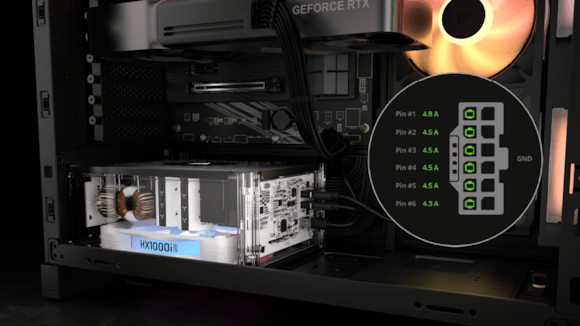
PinProtect+ per-pin OCP monitors each of the six 12V pins on the native 12V-2x6 GPU connection in real time, with per-pin current readings displayed in iCUE. If current on any pin exceeds the set threshold for longer than the delay, iCUE displays a warning and the fan’s RGB lighting turns red. If abnormal current continues, PinProtect+ reduces power to the GPU, causing it to shut down to help reduce the risk of damage, and the fan ramps to full speed. The default delay accounts for brief power excursions, a spike that resolves in time is recorded in the event log and no action is taken.
As an upgraded version of PinProtect, which is built into the RM1200e, PinProtect+ is customizable in iCUE. Users can set the current threshold from 7A - 10A (9.5A by default), choose a delay of 10 to 180 seconds, review the event log of overcurrent events and their pin readings, and check connection status from a PinProtect+ tile in the Cooling tab. After a restart from a shutdown, iCUE notifies users to check the included 12V-2x6 cable’s dual-tone connectors if the gray tips are visible, indicating that the cable is not fully seated. This makes a loose connection easy to spot. Although not recommended, PinProtect+ can be switched off in iCUE.
INTEGRATED iCUE LINK SYSTEM HUB
The integrated iCUE LINK System Hub simplifies system building by allowing compatible iCUE LINK devices to connect directly to the power supply, eliminating the need for a separate System Hub and its associated PCIe power cable. The integrated hub’s dual-channel design supports up to 24 connected iCUE LINK devices with 12 devices per channel, giving PC builders ample options when it comes to intelligent system cooling. Compatible devices daisy-chain together and are automatically detected by CORSAIR iCUE software, letting you customize fan speeds and RGB lighting per device.
SHIFTED CONNECTIONS
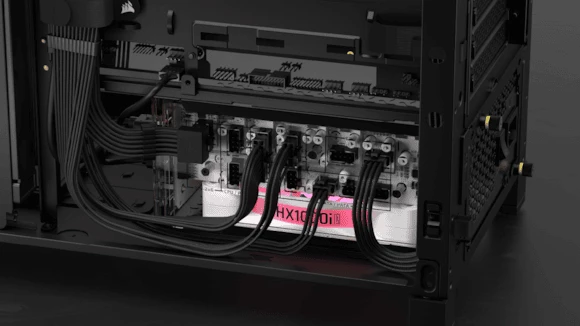
Side-mounted connections provide convenient access to CORSAIR Type-5 cables, and the fully modular design lets builders connect only the cables they need for simpler installation, cleaner routing, and a tidy interior. Premium individually sleeved cables with low-profile cable combs keep everything organized and professional looking, complementing the power supply’s unique design.
CYBENETICS PLATINUM-RATED EFFICIENCY FOR QUIET OPERATION
HX1000i SHIFT CRYSTAL delivers up to 91% overall efficiency, reducing heat generation for reliable, low-noise operation. It’s ATX 3.1 certified and PCIe 5.1 compliant, supporting power excursions of up to twice its rated output to maintain stability during demanding workloads and GPU power spikes.
The fan uses an optimized fan curve to deliver effective cooling while minimizing noise, and Zero RPM Mode automatically stops the fan at low to medium loads for silent operation, with the fan spinning only when additional cooling is needed. The 3D Y-pattern fan grille is designed to maximize airflow with minimal obstruction.
POWERFUL AND RELIABLE
Robust custom 105°C-rated capacitors contribute to reliable power delivery and long-term durability, helping deliver stable voltage, reduced ripple, and steady power to all components of the PC build. With 1000W of rated output, the HX1000i SHIFT CRYSTAL provides ample power for high-performance gaming systems and demanding components.
The unit is sold via Corsair's webshop for $339.99 (289.90EUR).

Comments (0)
No comments yet.