Logitech's MX 610 Laser Cordless mouse with IM and e-mail buttons
 Posted on
by Thomas De Maesschalck
Posted on
by Thomas De Maesschalck 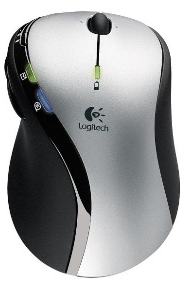
The mouse features a blue light for e-mail and an orange light for new IM messages. Logitech says it added this feature because computer screens are often cluttered with lots of information. The MX610 mouse senses when a new e-mail message comes into a user's Outlook inbox, and illuminates a blue light on the e-mail button. With one click of the illuminated button, the user opens the Outlook inbox to easily view the message.
Similarly, the PC sends, and the mouse receives, notification of new instant messages from Windows Messenger, MSN Messenger, and Yahoo! Instant Messenger, communicated with the illumination of an orange button on the mouse, which can easily be seen from across the room. With Logitech SetPoint software, people can customize their mouse so they are only notified when specific people send them e-mails or IMs. And if people need to leave their PC to do something in the other room, the mouse can deliver these notifications at a wireless range of up to 30 feet.
The Logitech MX610 Laser Cordless Mouse has an expected battery life of up to three months with regular use, a significant accomplishment considering its powerful Logitech MX Laser engine. The mouse achieves this long battery life by mimicking the power status of the computer to which it is connected. As it sends and receives wireless signals, the mouse can sense when the PC has gone into sleep mode or is shut down, and the mouse powers down accordingly. Also, when the mouse battery level is low -- less than 10 percent of full charge -- an indicator light on the mouse illuminates. Logitech has found that many cordless mouse owners have thought their cordless mouse was broken when it ran out of battery power. They simply forgot that the mouse used batteries. The indicator light and advanced power system help solve this problem.
The Logitech MX610 Laser Cordless Mouse includes a USB micro-receiver that connects instantly with the mouse when it is plugged into a desktop or a notebook PC. As the mouse and wireless receiver send information back and forth, the mouse periodically may sense a wireless interruption or interference. In a matter of moments, the mouse seamlessly shifts the wireless channel until it finds one that is interference-free. The micro-receiver eliminates clutter created by larger corded receivers.
Sculpted for the right hand, the Logitech MX610 Laser Cordless Mouse delivers a comfortable fit to go along with its versatile and stylish design. The mouse features 10 buttons, including volume up, down and mute buttons for controlling music on the PC. The reset button is noticeably absent, because once the receiver is plugged in, the mouse and receiver are perpetually connected. The mouse includes Logitech's Tilt Wheel Plus Zoom scroll wheel, which allows people to effortlessly scroll left, right, up and down, and zoom in and out of images, Web pages and open documents. The mouse's key plate is coated with a brilliant chrome finish, while a cool black display panel and matte black soft-touch grips help to create a sleek, modern styling that blends with the decor of today's sophisticated flat-screen monitors.

is this fake news? can't believe this is for real! email and IM buttons and lights? OMG !!!!!!! I have a Logi mouse (1000) and don't even use their crap software....
ReplyIt's real, Logitech announced this product today.
ReplySetPoint is not crap! You can adjust any mouse key for any application independantly. It's XML structure is very flexible.
ReplyThis mouse uses 2.4GHz frequency for wireless transmission. I got replaced all my 2.4ghz phones with 5.8ghz phones because 2.4ghz phones would interrupt my 802.11 b/g wilreless network. Does anyone know if this mouse will do the same? That would suck if every mouse movement/click would disconnect my laptop from the internet. Thanks.
ReplySo far no interruption on my wireless network.... at all, no hiccups no fast connects/disconnects nada... So far a great MICE. Even works well for gaming.
ReplyYes! 2.8GHz phones will interfere with the signal. I was having trouble with my mouse at my parent's house and wondered why the pointer would "stick" in one spot. A wireless phone was on the same desk.
ReplyAnyone have problems with the SetPoint software locking up when you receive an email through Outlook in Office XP Pro? If I get the email before clicking on the lit up blue button on the mouse - the software goes nuts and I have to end the process for Setpoint before things get back to normal.
ReplyAnyone having problems with getting the buttons light to actually work ??? I have called Logitech and got no solution so far. XP pro SP2 and outlook 2003 and I have checked mail notification is enabled. HELP !!
ReplyHi I have the same problems. I tried with the old software version on the cd and it helped a little bit. Now I got the light to work, but it takes a long before it actually lights and when you click the button it is not on the latest mail.
Replyi just bought one ond my solution is to throw the thing at a wall and go buy a diffrent brand
Reply