DV Hardware bringing you the hottest news about processors, graphics cards, Intel, AMD, NVIDIA, ATi, hardware and technology!

   Home | News submit | News Archives | Reviews | Articles | Howto's | Advertise
 
DarkVision Hardware - Daily tech news
  Login/sign up  


Main Menu

Home
User account
Info
News archives
Links
Articles
Howto
Reviews
Member list
 

Who's Online
There are currently 130 people and 0 DV-member(s) online.


Latest Reviews
  • Enermax Aeolus Premium CP003
  • Altego Clear Laptop Sleeve
  • Lian Li PC-V354
  • Arctic Cooling K381 keyboard
  • Arctic Power Charger Plus
  • ATP PhotoFinder Mini
  • BitFenix Colossus
  • Roccat Taito Kingsize mTw Edition mousepad
  •  

    RSS
    RSS
     

    Mobile Firefox user interface preview

    Posted on Thursday, January 31 2008 @ 10:03:04 CET by Thomas De Maesschalck


    Mozilla unveiled some details about the mobile version of Firefox, you can check it out over here.
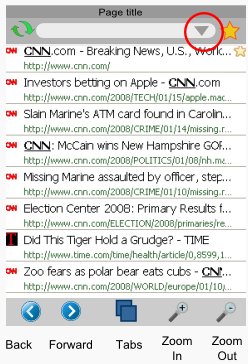
    The toolbar at the bottom contains the most frequently used functions - back/forward, zoom in/out and tabs. This toolbar cannot be hidden, and is generally present in all browser screens. The buttons may sometimes change depending on the screen.

    Web page content is displayed in the center panel, and can be scrolled/panned directly by dragging. Scrollbars are normally not shown to maximize screen real estate, but can be shown during scrolling to provide a visual cue of the overall page size.

    At the top of the screen is a title bar with a hideable toolbar beneath. This toolbar has a reload button, a URL bar, and a bookmark button.

    This UI layout enables quick 1-touch access to the most frequent browser activities.


    Threshold
      
    The comments are owned by the poster. We aren't responsible for their content.
     

    DV Hardware - Privacy statement
    All logos and trademarks are property of their respective owner.
    The comments are property of their posters, all the rest © 2002-2012 DM Media Group bvba
