Cooler Master's latest case is the Cosmos RC-1000, this case aims to offer very quiet operation and with its four big aluminum handles the design of this case definitely stands out from the crowd.
The Cooler Master Cosmos case features a special airflow system, it has one intake fan one the bottom and uses three outtake fans. The firm says this creates a negative pressure effect which will draw in more cool outdoor air into the interior to keep all your components cool.
Besides airflow Cooler Master also thought about soundproofing, cable management and tool-free design. In the next few pages, I will discuss all of these aspects and see if it works as advertised.
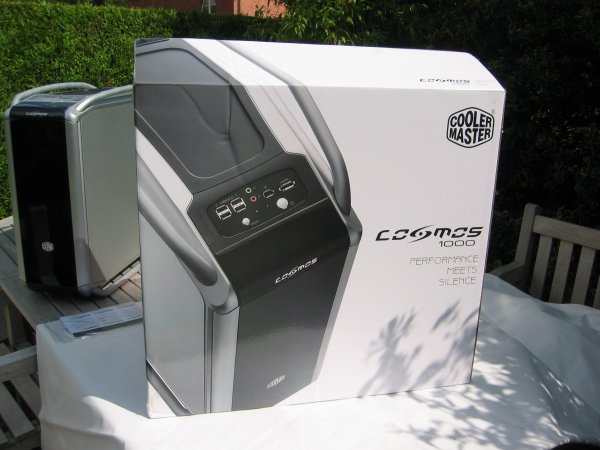
Here's a look at the box in which the Cooler Master Cosmos case ships. The box is nicely designed but when you try to lift it you immediately notice one of the biggest problems of this case: the weight. The Cosmos weighs a massive 16.9kg, which is more than twice as much as my previous case! The Cosmos is the heaviest case I've ever had in my hands.
One of the reasons for the huge weight is that the chassis is made out of steel. However, I heard that Cooler Master is planning to release an aluminum version of this case within a couple of months, that version will be lighter and therefore be the better choice for people who regularly go to LAN parties.
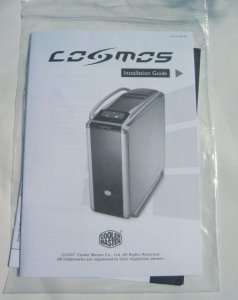
The case arrived without any visible damage and it took me a couple of minutes to remove all the scratch-resistant plastic film which protected the case during shipping. Inside the box I found the case and a brief installation manual:
Now before we move on to the case lets first take a look at all the features and specifications:
Features:
Superior Silent Environment:
Soundproof materials applied to build a quiet environment
Sound barrier design reduces vibration for silent operation
Thermal Solution:
Dual bottom air intakes to enhance air flow and reduce system noise
Six aluminum detachable HDD modules with ventilation holes for optimizing cooling performance
Side removable VGA cooling tunnel to advance thermal airflow.
Tool-free User-friendliness:
Patented finger pressing buttons for quickly maintaining or upgrading 5.25” drive devices
Tool-free design for opening side panel conveniently.
Cable Management:
Separate HDD modules make it easy to organize cable direction
Cable management system for better cable routing and neatness
Specifications:
Available
Color
Chassis
Appearance: Silver, Bezel: Black
Dimension
(W / H / D)
(W)
266 x (H) 598 x (D)628 mm
Weight
Net
Weight : 16.9 kg ; Gross Weight : 18.9 kg
Material
Chassis:
Steel, Appearance: AL
Motherboards
Extend
ATX, ATX
5.25"
Drive Bay
5
Exposed (without the use of exposed 3.5 inch drive bay)
3.5"
Drive Bay
6
( Hidden ) ; 1 Exposed (converted from one 5.25 inch drive
bay)
I/O
Panel
USB
2.0 x 4, IEEE 1394 x 1, Audio x 1, SPK x 1, eSATA x 1
Cooling
System
Bottom
fan ( intake ) :120 mm x 1, 1200 rpm, 22 dBA (included),
Top fan (exhaust) : 120x120x25 mm fan x 2, 1200 rpm, 17
dBA (included),
Rear fan (exhaust) : 120x120x25 mm x 1 (included),
HDD fan : 120x120x25 mm x 1 (optional),
VGA Wind Tunnel
Thomas has been messing with computer since early childhood and firmly believes the Internet is the best thing since sliced bread. Enjoys playing with new tech, is fascinated by science, and passionate about financial markets. When not behind a computer, he can be found with running shoes on or lifting heavy weights in the weight room.
Loading Comments
Comment #1 posted by Disappointed on 2011-01-29 18:49:30 I bought this case in May 2010. I wanted to open the left panel today (29/01/2011) to check for dust. I found that the relase latch on the left had become disconnected from the release mechanism for the left side panel. After exhausting other options I had to prise the panel off with a screwdriver and found that the screw holding the release mechanism together had become loose. A bad design falt. If you have one of these I advise that you check the screws connecting the latch to the release. Comment #2 posted by Llandudnoboy on 2009-01-31 16:32:03 Apart from the almost identical lighter Cosmos S which is made completely out of the more expensive aluminium this CoolerMaster Cosmos has just about everything that the perfect computer case should have.
When you carefully look at the way the case has been designed and put together you will soon realise why Coolermaster are charging a premium price for it.
All the components are to the highest specificaton with no single part made out of poor quality materials to cut down costs.
The HDD bays are crafted out of top quality aluminium with noise dampers installed and a most ingenious installation process with small blue handle stays.
The push shut dvd drive system of closure needs no use of any fixing tools or screws,it is a thing of simplicity and extream beatuy.The designer who came up with this clever solution must have spent some time thinking up this method of bay closure as it is so simple and effective that its brilliant.
There are not that many cases on the market where the power supply is placed on the floor of the case as with the Cosmos.It certainly allows for greater room inside and also available space for huge PSU like the Enermax Galaxy which is 220mm long,too big for your average case.
Most people who will buy the Cosmos will be gamers who more often than not will choose a modular supply which allows for more efficient interior useage.
The Cosmos has four cooling fans,two on the top drawing the rising air through the top,the usual rear entry fan and a fan at the bottom of the case next to the PSU.
The floor of the case has two ducts allowing cooler air to travel inwards with one of the fans pulling in the air towards the graphics cards.These ducts have dust guards that can easily be removed for cleaning by simply sliding them out throughthe sides.
One thing that the Cosmos has that i cannot remember seeing in any other case other than the Cosmos S is a graphics cooler duct that runs the entire length of the motherboard.It is a over engineered piece of plastic that can easily be removed but is excellent at its intended job of running cooling air over your cards out through the rear exit fan.
The top of the case has what must be some of the highest quality on and off power switches i have ever used.They are constructed out of aircraft grade aluminium in a satisfying anodised black.There is a equally stunning rest button aswell.
The appearence of the case is a matter of opinion with carriying handles top and bottom.The bottom ones act as legs to raise the case off the fllor several inches to provide airflow.
The top handles are necessary as the Cosmos weighs nearly 18Kg before you even start to place your expensive and often heavy gear inside.
There is one thing you cannot denie in that Coolermaster have spent a great deal of time carefully designing this case to be extreamly functional and easy to use.
Everything right down to the changeable frontdoor has been made out of the best quality materials and if you care to spend a further £25 you can have the case with the gorgeous clear side panel so you can show off your system to your friends.
Yet again this clear side panel is made out of high grade aluminum and very high quality acrylic plastic,the kind that doesnot flex or scratch easily.
If after reading this review you still think the Cosmos is too expensive a purchase have a look at one in the flesh,you will certainly admire its quality and if you are bulding a gamers rig there are few cases on the market as large as the Cosmos.
You will have few problems in installing all your equipment,and if you are thinking of water cooling your system the Cosmos has been designed around this very process with the top of the case taking a reservoir and two outlets on the back for the pipes.
My Cosmos is only three months old and still in the box because i am still building up my system for the eventual build which will take place in March 2009.
I have not rushed anything,asking myself why do i need a certain component and for what purpose.
I will be running thrree Nvidia 8800Gtx cards with a Q6700 processor.My supply is the enermax Galaxy 1000 modular.
A Thermalright 120 Extream cooler along with possibly 8 Antec TriCool fans.Four built inside the case and another four on two Zalman BR123 fan brackets pointing towards my cards and Crucial Ballistix memory.
The system has been well thought out and only the Coolermaster Cosmos provided me with everything i needed space wise.
The reason i didnot go for the lighter Cosmos S was because of the troublesome touch sensitive on off power button which has caused a friend no end of problems.
It looks good whilst it works but the foolproof push button should never cause any problems,neither should the purchase of Coolermasters superb case.
Comment #3 posted by Anonymous on 2008-12-30 04:36:25 Great looking case. Loved it until the second HD burned up -- it was RAID0 so I lost everything. (Don't talk to me about backups... it's still a major pain.)
This case is simply designed poorly with regards to heat management. I run dual SLI cards on an EVGA 780i. It's a little hotter than usual to begin with. The Cosmos is about the worst case you could ask for in terms of "performance" cases. It looks great... but that's all.
The only way to prevent burning up the cards and HDDs is to leave the side off. Extremely lame. Cosmos screwed this one up. Comment #4 posted by Anonymous on 2008-07-15 22:01:43 I've just ordered this based on your review. Thanks.
Sincerely,
Ole Reidar Johansen
www.fysioterapi.info Comment #5 posted by polarpax on 2008-02-18 09:52:24 This is all most my dream case. 1. Aluuminum case.
2. With handles. 3. A roll-up front door. Well Two out of three is not bad. The door comes off or on in sec. so it can be out of your way when useing. I like that. But still like a roll-up door. There are all kinds of neat things about this case. big fans top ( to let the heat out as heat rise duua in some case trying blow it out at a lower level) Somtimes I wonder about educational system. To my supprise the case is like a suit case big & it weights alot needing handles. The side cover can be carved any wayyou like putting pace of lexon plastic on the backside, adding your lights in the case, giveing a custom look. The big draw back was the size. But now I love it. no cramped areas to try and jam things in blocking air circulation. One of the things I have though about from time to time is dust blockers. Well they got that covered as well. In short this is well though out with common sense design. polarpax Comment #6 posted by Anonymous on 2008-02-01 22:05:16 Superb review Thomas with brilliant pictures of this case from all angles. I will be purchasing one soon on the strength of your review.
Many Thanks,
Mike Comment #7 posted by Thomas De Maesschalck on 2007-12-10 22:18:19 "It does! Maybe yours fell off but it certainly does."
I'm sure it wasn't included with my case. Perhaps CoolerMaster updated the case to address some of the issues that I and other reviewers reported about :) Comment #8 posted by Anonymous on 2007-12-10 21:18:48 "As you can see the VGA duct is pretty easy to remove. The only thing I don't really like about this is that the ventilation holes through which air is drawn into the case don't have a dust filter. "
It does! Maybe yours fell off but it certainly does. I want another 'optional' bracket to blow over the HDs but can't find one anywhere. I like having the directional one facing my GFX card (I lost the air duct for GFX cards as I modded a window into it, the foam is a real pain to get rid of).
Other than the inclusion of another bracket, everything is built solidly, feels good to touch and definitely look at! Comment #9 posted by Anonymous on 2007-11-15 23:35:44 Besides, I'm still to find a case with proper air filters (anything that's not good enough for an engine, shouldn't be for electronic components). Comment #10 posted by Anonymous on 2007-11-15 22:59:22 You call that dust filters?
I had to put kitchen exhaust filter on mine and you should see how ineffective it still is (for dust, thankfully pet hair now just clogs on the outside...). Comment #11 posted by Anonymous on 2007-11-04 14:12:16 I got the Cosmos now for a couple of weeks, and it is not "the best case in the world" Sure it looks great and there some really nice features, but the worst thing are the HDD cages. My guess is that it is almost impossible to keep 6HDDs cool in the case. My HDDs (3) get quite hot (5 - 10 celsius more) compare to my old low cost CM case.
and the fan ducts are a terrible idea, they take far too much space and HDDs need more than just a "breeze" from the side.
I dont use (cant use) my 3.5 bay (front) anymore as I put and put a extra fan in. blowing on the hdds down and removed the two cages in the middle. still not good, but better!
Considering that I run 6 fans now it is not that loud, but silent? Nope.
Conlcusion: Not bad, but still room for improvement! Comment #12 posted by Thomas on 2007-07-23 17:51:14 The HDD cages are pretty luxury and the design makes cable management easy, therefore I put them on the + list. The reason why they run a bit hotter than in most other cases is because they don't get a lot of direct airflow. In many other cases there's an intake fan which blows a lot of air over the HDDs, in the Cosmos that isn't the case. I see this more as a flaw in the cooling system than as a problem with the cages. Comment #13 posted by Anonymous on 2007-07-23 00:51:01 How is this a "good hdd mounting system"
if the "hdd's run a bit hot"? Comment #14 posted by Anonymous on 2007-07-22 18:29:09 There's suppose to be an optional fan that will install above the hard drive cage occupying 2 5.25". This should keep the hard drives from heating up.