ThermalTake NBcool T3000 Heatpipe Notebook Cooler review
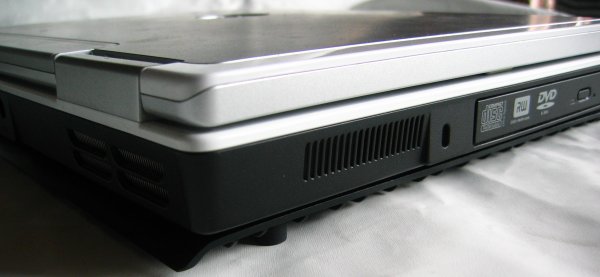
Before we move on to the testing here's a photo of the Dell Inspiron 6000 on the ThermalTake T3000. The notebook cooler is so small that it's barely visible. The T3000 weighs 866g and measures 320 x 260 x 6mm.
ThermalTake T3000 Heatpipe notebook cooler performance tests
To test the performance of the T3000 notebook I recorded the idle and load temperatures of a Dell Inspiron 6000 notebook with and without the cooler. I've also compared the results to the ones I got from the Jetart CoolStand 2 which was tested in exactly the same fashion. All temperatures were taken with Speedfan. Idle temperatures are taken after letting the notebook rest for about 20 minutes in Windows XP and load temperatures were taken after performing three PCMark05 benchmark cycles.
Here are the specifications of the test system:
Dell Inspiron 6000
First the idle temperature results:Intel Pentium M 750 (1.86GHz) processor ATI Mobility Radeon X300 128MB 1GB DDR2 533MHz memory 100GB 5400RPM HDD
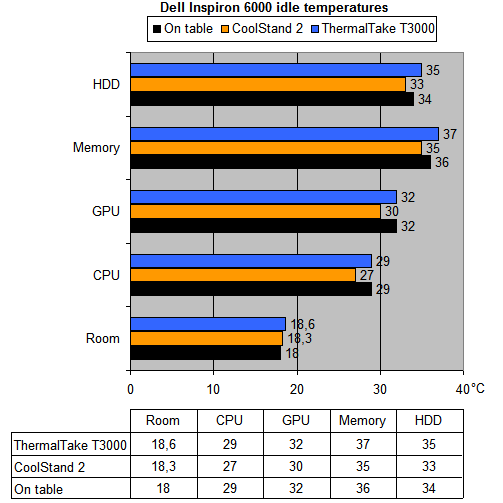
In the idle results, the T3000 doesn't really shine - the GPU and CPU temperatures are the same and the HDD and memory temperatures are 1°C higher than without the cooler. The most likely explanation for this is the higher ambient temperature. While testing the T3000 the room temperature was 0.6°C higher and when you take this into account you'll notice that the performance with and without the cooler is pretty much the same.
The load temperatures are more interesting:
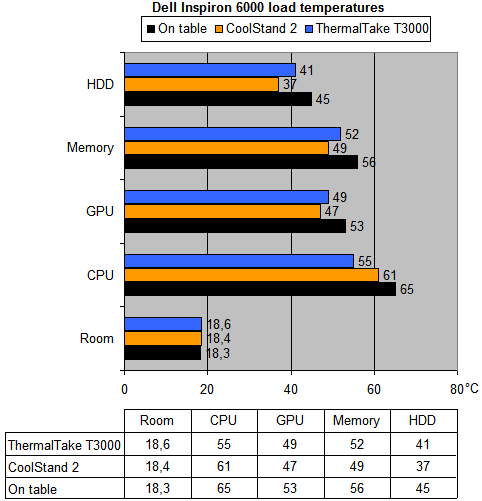
The performance of the ThermalTake T3000 in the load test surprised me. I thought it would reduce the temperatures by a couple of degrees but I didn't expect the difference would be this big. Compared to the results without the cooler the HDD temperature dropped 4°C, memory 4°C and GPU 4°C with the T3000 cooler. But that's not everything, what surprised me the most is that the CPU temperature dropped a whopping 10°C from 65°C to 55°C. In three tests the CoolStand 2 outperformed the passive T3000 but at cooling the CPU the T3000 did a much better job.
I also felt with my hand at the base of the notebook after the three tests. Without a cooler the base felt very hot, with the Jetart CoolStand 2 the base felt cold and with the ThermalTake T3000 the base felt lukewarm.
Noise test
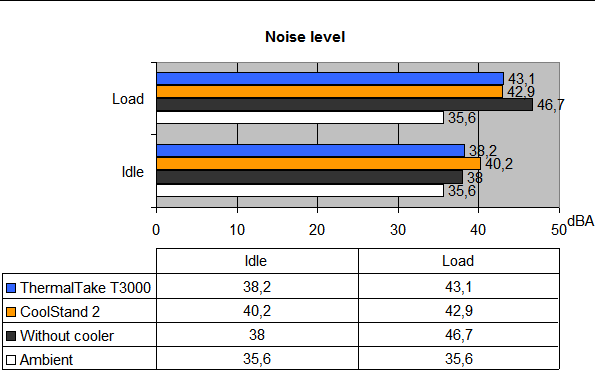
While measuring the temperatures I also measured the noise level with the AR824 decibelmeter. As the ThermalTake T3000 doesn't feature a fan it doesn't produce any noise but I wanted to check if the cooler would have an effect on how fast the notebook's internal fan has to spin. In idle the CoolStand 2 makes the most noise, it increases the noise level with 2dBA. In load the difference between the T3000 and CoolStand 2 is very small, but coolers do a good job at keeping the notebook's noise down.
Conclusion
The ThermalTake T3000 heatpipe notebook cooler impressed me, it performed much better than I expected from a passive laptop cooler. The product is able to bring down the load temperatures of all components in the notebook and because of the improved cooling the notebook's fan has to work less hard which results in less noise.
The Good Stuff
- Cools well for a passive cooling solution
- Nice design
- Compact, easily fits into a notebook bag
- Allows you to use your laptop on your lap without getting burned
- Uses no power
The Bad Stuff
- Anti-slip feet come off easily
I give the ThermalTake T3000 notebook cooler a 9/10 and our Seal of Approval.

 Previous Page (2/3)
Added: November 21st 2007
Product reviewed: ThermalTake NBcool T3000 Heatpipe Notebook Cooler
Reviewer: Thomas De Maesschalck
Score: 9/10
Page: 3/3
