DV Hardware bringing you the hottest news about processors, graphics cards, Intel, AMD, NVIDIA, ATi, hardware and technology!

   Home | News submit | News Archives | Reviews | Articles | Howto's | Advertise
 
DarkVision Hardware - Daily tech news
  Login/sign up  


Main Menu

Home
User account
Info
News archives
Links
Articles
Howto
Reviews
Member list
 

Who's Online
There are currently 132 people and 0 DV-member(s) online.


Latest Reviews
  • Enermax Aeolus Premium CP003
  • Altego Clear Laptop Sleeve
  • Lian Li PC-V354
  • Arctic Cooling K381 keyboard
  • Arctic Power Charger Plus
  • ATP PhotoFinder Mini
  • BitFenix Colossus
  • Roccat Taito Kingsize mTw Edition mousepad
  •  

    RSS
    RSS
     

    Howto create spectacular HDR photos

    Posted on Monday, January 29 2007 @ 20:07:50 CET by Thomas De Maesschalck


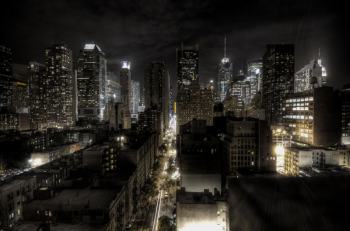
    A HDR photo of New York
    TG Daily has a short howto that explains what high dynamic range photography is and how you can create such images. HDR is a technique that merges multiple exposure shots of the same scene to create breathtaking images like this Tokyo nightscape, this amazing port scene and this agricultural landscape. Like you see, what HDR you can turn otherwise boring pictures into eyecandy.

    Here's a short snip from TGD's guide:
    You'll be taking several shots at different exposure levels. On a Canon Digital Rebel, you change the exposure level by holding the Av button on the back and then moving the scroll wheel which is behind the shutter button. In our case, we moved the exposure to -2 and took a shot, then up one notch to take another shot. We continued until taking shots up to and including the +2 exposure setting. If you don't want to take so many shots, you can just do -2, -1, 0, +1 and +2. You can also use the bracketing feature in your camera to take different exposure shots automatically one after the other.



    Threshold
      
    The comments are owned by the poster. We aren't responsible for their content.
     

    DV Hardware - Privacy statement
    All logos and trademarks are property of their respective owner.
    The comments are property of their posters, all the rest © 2002-2012 DM Media Group bvba