DV Hardware bringing you the hottest news about processors, graphics cards, Intel, AMD, NVIDIA, ATi, hardware and technology!

   Home | News submit | News Archives | Reviews | Articles | Howto's | Downloads | Mirror Area | Advertise
 
DarkVision Hardware - Daily tech news
  Login/sign up  


Main Menu

Home
User account
Info
News archives
Links
Articles
Howto
Reviews
Member list
 

Who's Online
There are currently 436 people and 0 DV-member(s) online.


Latest Reviews
  • Kingston DataTraveler 150 32GB USB drive
  • Super Talent Pico 8GB USB Drive
  • Razer Destructor mousepad
  • Ghost Squad for Nintendo Wii
  • OCZ DDR2 PC2-9200 Reaper HPC Edition
  • Vizo Ninja II notebook cooler
  • PC Power & Cooling Silencer 610 PSU
  • Mario & Sonic at the Olympic Games for Nintendo Wii
  •  

    RSS
    RSS
    RSS by email. Enter your email address:


    Recommended: Click here to Update all your outdated drivers

    Speedfan 4.09 download mirror

    Posted on Sunday, November 30 2003 @ 22:54:48 CET by Thomas De Maesschalck


    I have added a mirror for a great program called Speedfan 4.09. I already use it for a couple of months and I really like it. It is a clean, orderly simple program to measure temperatures, voltages and fan speeds. You can also adjust the speed of fans with this program and a lot more.

       Download Speedfan 4.09 here.
    SpeedFan is a freeware program that monitors fan speeds, temperatures and voltages in computers with hardware monitoring chips. SpeedFan can even access S.M.A.R.T. info for those hard disks that support this feature (almost all :-)) and show hard disk temperatures too, if supported. SpeedFan can even change the FSB on some motherboards. At the lowest level, SpeedFan is an hardware monitoring software, but its main feature is that it can control the speed of the fans (depending on your sensor chip) according to the temperatures inside your pc, thus reducing noise and power consumption. Most Winbond sensors and ASUS AS99127F support fan speed changing, as well as others from MYSON, ANALOG DEVICES, NATIONAL SEMICONDUCTORS and ITE, but the motherboard should make use of available pins. This means that if you have, say, a W83782D on a BP6 then you're ok. If you have a W83782D on some GigaByte's... you're not :-) SpeedFan works fine with Win9x, WinME, WinNT, Win2k and WinXP. SpeedFan can be minimized to the tray and is compatible with Motherboard Monitor
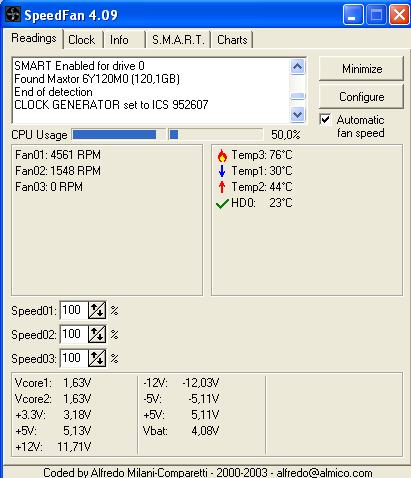
    Speedfan 4.09


    Add to Del.icio.us | Digg It

     
    Threshold
      
    The comments are owned by the poster. We aren't responsible for their content.
     

    DarkVision Hardware - Privacy statement
    All logos and trademarks are property of their respective owner.
    The comments are property of their posters, all the rest © 2002-2008 DarkVision Hardware
