DV Hardware bringing you the hottest news about processors, graphics cards, Intel, AMD, NVIDIA, ATi, hardware and technology!

   Home | News submit | News Archives | Reviews | Articles | Howto's | Advertise
 
DarkVision Hardware - Daily tech news
  Login/sign up  


Main Menu

Home
User account
Info
News archives
Links
Articles
Howto
Reviews
Member list
 

Who's Online
There are currently 225 people and 0 DV-member(s) online.


Latest Reviews
  • Enermax Aeolus Premium CP003
  • Altego Clear Laptop Sleeve
  • Lian Li PC-V354
  • Arctic Cooling K381 keyboard
  • Arctic Power Charger Plus
  • ATP PhotoFinder Mini
  • BitFenix Colossus
  • Roccat Taito Kingsize mTw Edition mousepad
  •  

    RSS
    RSS
     

    Firefox 3.7 UI looks like a mix of IE8 and Chrome

    Posted on Thursday, September 24 2009 @ 17:36:08 CEST by Thomas De Maesschalck


    Mozilla published a screenshot of the new user interface for Firefox 3.7. The developers feel that Firefox looks dated and behind on Windows, and therefore they're working on a major overhaul that will make the browser look like a mix of Google Chrome and Internet Explorer 8.
    As noted on the 3.0 Windows Default Theme Issues Wikipage, Firefox feels dated and behind on Windows. Especially Vista and Windows 7. These issues include absence of Glass, anemic purple toolbar color on Vista, tall and bulky UI footprint, element overload, inconsistent toolbar icon usage/style, lack of a tactile look & feel and perhaps too great of a divergence between the look on XP and Vista/7.

    The proposed direction to correct these shortcomings includes:

    * Embracing Glass: Toolbar and Tabs using Glass. Raised translucent buttons that are slightly glossy to meld with the toolbar. Raised 3D look to achieve tactile "feel".
    * Neutral Tones: Overall neutral color scheme that can transition among platforms. Can remain attractive and slick without fighting for focus from web content.
    * Hiding the Menu Bar: Hiding the menubar by default(on Vista/7) allows us to use Glass, free up vertical space and retain platform consistency.
    * Page and Tools Buttons: Condense and trim existing menu structure into two buttons "Page" and "Tools". Similar to Safari and Chrome.
    * Combine Stop/Reload: Combine Stop and Reload into one button. Reduces visual "clutter" and combines two buttons that have mutually exclusive functionality.
    * Home Button/Tab: Remove "Home" Button from default toolbar. Move functionality to a "Home Tab" containing your homepage.
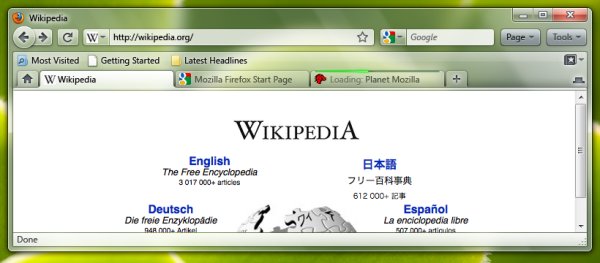

    Source: OS News


     
    Threshold
      
    The comments are owned by the poster. We aren't responsible for their content.
    Re: Firefox 3.7 UI looks like a mix of IE8 and Chrome (Score: 1)
    by Thomas De Maesschalck (lsdsmurf@dvhardware.net) on Thursday, September 24 2009 @ 17:37:00 CEST
    (User Info | Send a Message) http://www.dvhardware.net
    Can't say I'm happy with this, I'm a fan of the clean look of the current Firefox. The new UI looks like a mess.


    [ Reply to This ]


    DV Hardware - Privacy statement
    All logos and trademarks are property of their respective owner.
    The comments are property of their posters, all the rest © 2002-2012 DM Media Group bvba