DV Hardware bringing you the hottest news about processors, graphics cards, Intel, AMD, NVIDIA, ATi, hardware and technology!

   Home | News submit | News Archives | Reviews | Articles | Howto's | Advertise
 
DarkVision Hardware - Daily tech news
May 24, 2013 
Main Menu

Home
Info
News archives
Links
Articles
Howto
Reviews
 

Who's Online
There are currently 129 people online.


Latest Reviews
Antec soundscience halo 6 LED bias lighting kit
Noctua NM-I3 SecuFirm2 Mounting Kit
Two months with Windows 8
Cooler Master Silencio 650
CM Storm QuickFire TK mechanical keyboard
Kingston HyperX 3K 240GB SSD
Sennheiser HD 555
ROCCAT Pyra Wireless mouse
 

RSS
RSS


Howto: Adjust Windows 7 desktop icon size



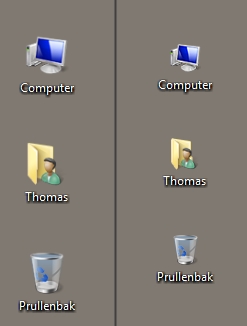
When I booted Windows 7 for the first time one of the things I immediately noticed is that the desktop pictograms were huge compared to my good old Windows XP. These big pictograms take up a lot of real estate on your screen so I started looking for a way to scale them down a bit.

Mouse scroll method
By far the easiest method to adjust the size of the desktop icons is by using the scroll wheel of your mouse. First click on a random empty spot on your desktop, and then hold CTRL down on your keyboard while moving the mouse wheel up or down to make the pictograms either larger or smaller.

Window Color and Appearance method
Don't have a mouse wheel? Don't worry because you can do the same thing via the Personalization menu.

Here are the steps:
  • Just right click anywhere on your desktop and select "Personalize".
  • Now click on "Windows Color and Appearance" and then click on the last link to open the advanced menu.
  • In this menu you need to select the item "Icon".
  • By default the font size is 12, you can make the icons smaller by choosing a smaller number or make them bigger by selecting a larger number.


[ Back to Howtos ]


DV Hardware - Privacy statement
All logos and trademarks are property of their respective owner.
The comments are property of their posters, all the rest © 2002-2013 DM Media Group bvba