DV Hardware - review of Imation Disk Stakka
   Home | News submit | News Archives | Reviews | Articles | Howto's | Advertise
 
DarkVision Hardware - Daily tech news
  Login/sign up  

Main Menu

Home
User account
Info
News archives
Links
Articles
Howto
Reviews
Member list
 

Who's Online
There are currently 154 people and 0 DV-member(s) online.


Latest Reviews
  • Enermax Aeolus Premium CP003
  • Altego Clear Laptop Sleeve
  • Lian Li PC-V354
  • Arctic Cooling K381 keyboard
  • Arctic Power Charger Plus
  • ATP PhotoFinder Mini
  • BitFenix Colossus
  • Roccat Taito Kingsize mTw Edition mousepad
  •  

    RSS
    RSS
     

    Imation Disk Stakka Review

    Posted on Wednesday, February 09 2005 @ 00:14:35 CET by LSDsmurf


    Ejecting disks is pretty simple. Find the disk you want, by searching or browsing the database, then rightclick and choose Eject. If the disk won't be coming back, choose Eject and Remove. If you're lending the disk to someone, you can make a note of who the borrower is in the disk's database entry, which pops up when the CD is ejected. Can't remember who you loaned DOOM 3 to? Now you can, by referring to the CD's entry in the database.

    Link: OCAU
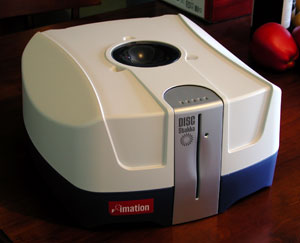
    Imation Disk Stakka


    Post your thoughts on this product | | 0 comments


    DV Hardware - Privacy statement
    All logos and trademarks are property of their respective owner.
    The comments are property of their posters, all the rest © 2002-2012 DM Media Group bvba