Jetart CoolStand 2 NC5000 notebook cooler review
Jetart CoolStand 2 performance tests
To test the performance of this notebook cooler I did three tests. First I took idle/load temps with the laptop sitting on a table, then I put it on the CoolStand 2 in the highest stand without the fan and for the last test I plugged in the fan. To get the idle temperatures I let the notebook rest for about 20 minutes in Windows XP and to get the load temperatures I ran PCMark05 three times.
Here are the specifications of the test system:
Dell Inspiron 6000
First the idle temperatures:Intel Pentium M 750 (1.86GHz) processor ATI Mobility Radeon X300 128MB 1GB DDR2 533MHz memory 100GB 5400RPM HDD
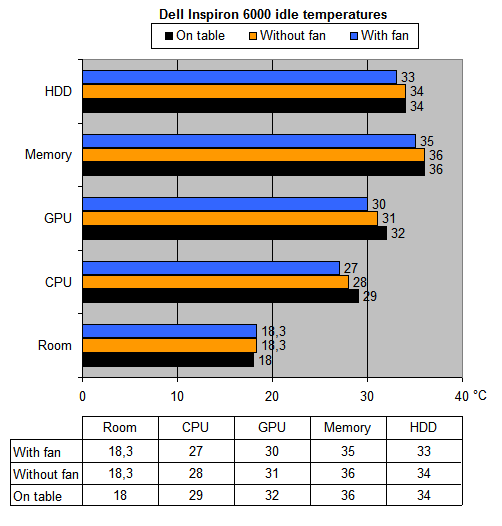
The CoolStand 2 is able to bring down the idle temperatures a bit but the difference is quite small. Even without the fan the cooler reduces the temperatures a bit.
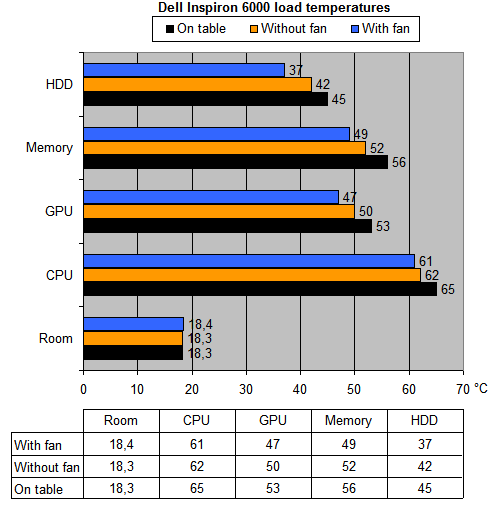
The load temperatures are more interesting: the CPU temperature drops 4°C, the GPU 6°C, the memory 7°C and the HDD runs 8°C less hot. The base of the notebook also gets considerably less hot with the CoolStand 2, without the cooler the base gets very hot but with the CoolStand 2 it remains quite cool.
Just like in the idle test I noticed that the temperatures run a lot less hot if you raise the notebook a bit, the extra air definitely helps.
Noise level
During the previous tests I also checked the noise levels with the AR824 decibelmeter to see which mode results in the least amount of noise. The noise was measured at a distance of 30cm with an ambient noise level of 35.6dBA.
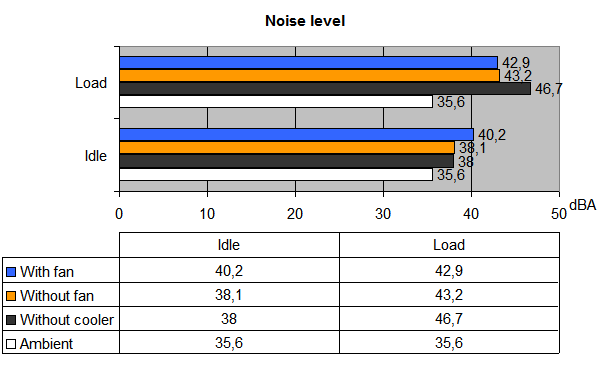
The idle and load results are completely the opposite. In idle the quietest mode is without the cooler while in load the notebook makes the least noise with the cooler + fan turned on.
Unfortunately, the fan of the CoolStand 2 isn't exactly "ultra quiet" - I didn't need a decibel meter to notice the audible increase in sound level when I plugged in the fan of the CoolStand 2. According to the AR824 meter, the sound level increased 2dBA.
Under heavy load the CoolStand 2 helps to keep the noise down. Without a cooler the notebook ramps up to 46.7dBA while with the cooler it only reaches 42.9dBA
Conclusion
The CoolStand 2 cooler was able to bring down the temperatures of the test system a lot and thanks to the extra cooling it lowered the sound level by a few decibels. Unfortunately, the product also has some shortcomings. The fan isn't exactly ultra-quiet, under load you won't really notice the fan noise but when you're laptop isn't doing a lot of heavy work you'll notice that the CoolStand 2 increases the noise level a bit.
Another thing I didn't really like is the build quality. The plastic felt kinda cheap, it would be better if the cooler used some sturdier materials like aluminum. Perhaps the cooling performance would also benefit from this. Besides the good cooling performance, the product also has two other cool features: it can raise your notebook (four different stands) and features a swiveling base.
The Good Stuff
The Bad Stuff
I give the Jetart CoolStand 2 NC5000 a 7.5/10.
 Previous Page (2/3)
Added: November 19th 2007
Product reviewed: Jetart CoolStand 2 NC5000 notebook cooler
Reviewer: Thomas De Maesschalck
Score: 7.5/10
Page: 3/3
