Epson PictureMate Deluxe Viewer Edition (PictureMate 500) review
Bad points:
The only negative comments I have are quite superficial and it should be noted
that we computer science students seem to have a genetic propensity for pointless
trivialities!
Generic issues:
1) It comes with 20 sheets of photo paper but the ink cartridge prints 100 photos.
Because the paper input tray holds 20 sheets, that is all they supply, so buy
an Epson PicturePack (Includes Photo Cartridge and 100 photo paper sheets RRP
£21.50) or an 10 sheet pack or glossy photo paper (RRP £02.50)!
2) The rechargeable battery is not included (AAP £49.99), I would have paid a bit more if it was. Okay, if this wasn't being marketed as a portable system then fine it is an option, but it is and have you ever bought a laptop without a battery? I have thus not located a supplier within the United Kingdom that sells the optional battery.
3) No USB cable is included (RRP £2.50), maybe they think its unnecessary, but they do supply the computer drivers and have you ever bought a printer without a data cable? I could understand no batteries but no USB cable?
Hardware issues:
1) Like all photo printers I've used, it doesn't automatically resample images,
the relative resolution of a digital photo (ie its total output size) is slightly
larger than the photo paper so approximately 1.5 cm around the perimeter of
the photo is not printed (note that the area to be removed is indicated by a
border when previewing photos individually).
2) Media devices can not be accessed concurrently, not really a bad thing but annoying as I would like to setup a print run from 3 memory cards then walk away for a coffee.
3) Depending on the nature of your photos, the ink cartridge can, under special conditions, only last for a little as about twenty pictures. I regularly get 88-95 prints per cartridge, but I tend to do my photo adjustments with Paint Shop Pro before printing otherwise dark photos
4) The cover protecting the media card slots is slightly adynamic and just not very robust,
5) Unlike the media card slots, there is no cover protecting the EXT/Print and SUB ports, also these ports are quite deeply recessed into the body thus preventing use of less compact flash media drives.
Printing issues:
1) When printing photos, the LCD screen displays the total sheets to be printed
and the number remaining, I would like information about the estimated lapse
/ time remaining. It would also be nice if it displayed the photo being printed
as a background for the screen (like it does for the top level menu screen)..
2) Despite any claims by Epson, printing times are variable depending on factors such as ink level, complexity of the job and photo resolution. When printing groups of photos the time taken averages out to about 37 seconds for standard 5 megapixel prints. Printing 4 different Passport size photos takes about 1 minute and 64 seconds and index prints (20 photos per sheet) takes about 1 minute and 5 seconds (not including ink charging time with is about 20 seconds) .
3) The index view does not show how many sheets are required to complete the total job, this is normally 1 per print but in the case of index, passport and double formats this is not true. This information is included when previewing photos individually.
4) This may sound like a strange complaint but, apart from photo enhancement being set to ‘off' by default, there are no economy or resolution options. You could say it's a photo printer, so why create ‘bad' prints? However, I often want to quickly print a ‘throw-away' photo on cheap paper. You can get economy paper so why waste ink on poor quality paper (and remembering the less ink you use, the quicker the process)?
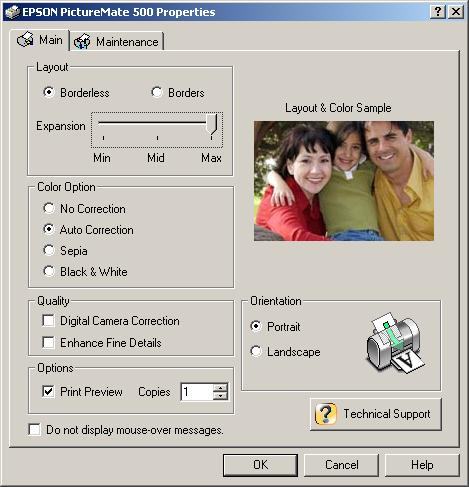
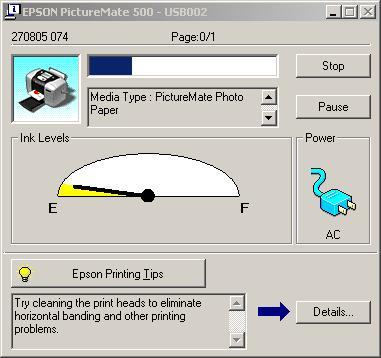
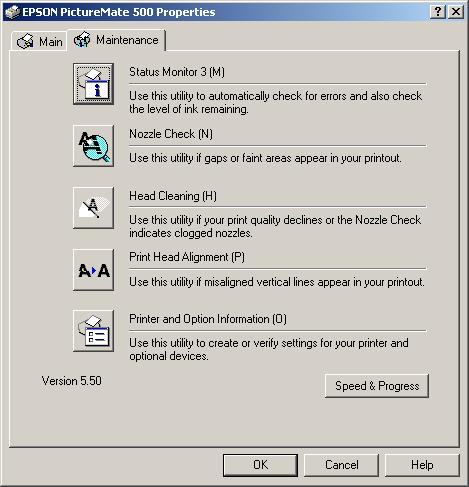
5) Good computer driver interface, but does not include all the photo effects & options available from the printers interface. Note that the host applications native printing configuration overrides critical orientation, page area and aspect ratio settings which need to be manually adjusted.
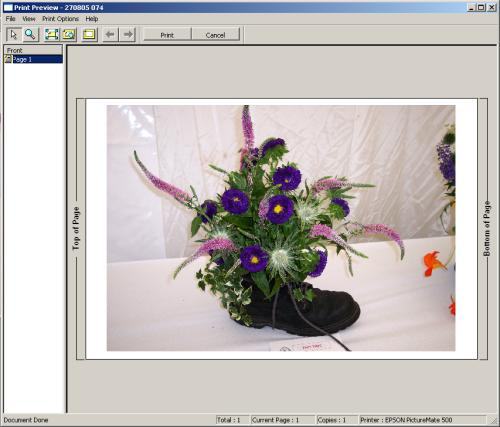
6) The preview option of the computer interface does not allow changes to the settings, you can only cancel. Although this isn't hard, it is slightly annoying if the host application does not save the last used settings so you must then start again from the default settings.
Interaction issues:
1) Photos are displayed in descending alphabetic order according to the photo
file names, thus photos from a camera will seem to be displayed in the order
they were taken, but this is totally dependent on the naming conventions of
your camera. This can seem quote disorienting with large volumes of photos organised
with real file names.
Most often photos are named with a short prefix then an incremental value equal to the total number of photos taken since it was first used.
2) Cropping photos must be done one at a time, ie there is no way to apply cropping to a set of range of photos, annoying as this is often required for groups of photos and is time consuming.
3) when printing photos with frames, they can not be rotated or cropped and there is no preview when printing photos with frames from a media card, as opposed to the 16 default frames where there is. This means the manipulation must be done elsewhere first.
4) After scrolling through a set of photos and then printing a single image, the index preview returns to the first image in the set, not from the previous position, quote disorienting with large volumes of photos.
5) Scrolling through a set of photos can start at the beginning or from the end of the group but the index view could be more efficient if there was a way to ‘skip' forward and backwards through each set of 9 photos, in addition to scrolling forward and backwards through the photos individually.
6) There is no way to filter photo formats, all JPEG and TIFF images are shown, I would like to select which types are displayed. Also I would like it to identify any ‘unpaintable' images (ie too big/small/wrong resolution), instead of ignoring them.
Software issues:
1) The directory structure of the storage media is ignored by the preview and
selection displays, ie all photos are grouped together regardless of their physical
location within the storage media.
A file explorer type view or some separation between photo sets would be nice. Note that the display can be sorted by date, but that's not quite helpful enough for a large volume of photos.
2) The date & time stamp, colour, size and position are not configurable, annoying if photos happen to include yellow, orange or red in the botton right area (depending on orientation). There is no format for a 2 digit year and the most compact format is american ie yyyy.mm.dd, (ie backwards and full stop (not slash) delimited)
3) Depending on the relative resolution, photo previews are not generated instantly and initially produce a low-res picture on the LCD but refines quickly - not a real issue but this can be time consuming if scrolling through many preview displays looking for a photo.
4) There is no provision to organise or manipulate the images on the storage media, since the directory structure is totally ignored, but I would like the ability to selectively delete groups by date or selected photos and the ability to format the media, indeed this can be done from the camera but that's not always possible, I often find someone has taken the media reader and the camera is in use.
 Previous Page (2/4)

Added: March 22nd 2006
Product reviewed: Epson PictureMate Deluxe Viewer Edition (PictureMate 500)
Reviewer: Michael Hart
Score: 9.9/10
Page: 3/4